


Frequently Asked Questions
General
Membership
Auto-Pay for Memberships
Annual Conference and Proposals
Certification
Core Competencies
General
What is the American Society for Bioethics and Humanities (ASBH)?
The Society is an educational organization whose purpose is to promote the exchange of ideas and foster multi-disciplinary, inter-disciplinary, and inter-professional scholarship, research, teaching, policy development, professional development, and collegiality among people engaged in all endeavors related to clinical and academic bioethics and the health-related humanities.
How large is ASBH?
ASBH membership varies throughout the year, but as of September 2024, ASBH has more than 2,050 members.
Does ASBH have a set of bylaws?
ASBH’s Bylaws describe the purpose of the organization, the makeup of its Board of Directors and major standing committees, and major rules by which the Board must abide. Read ASBH’s Bylaws here.
Can ASBH take “stands” on moral or policy issues?
ASBH leadership and its Board of Directors must abide by ASBH’s Bylaws, which prohibit the Society from attempting to influence legislation and issuing positions on substantive moral and policy issues. The Society may, however, adopt positions on matters related to academic freedom and professionalism in the fields of bioethics and the health humanities upon an affirmative vote of two-thirds (2/3) of the full Board of Directors. Read ASBH’s Bylaws here.
What statements has ASBH made that are permissible within our bylaws?
See our most recent statements on Academic Freedom and Racial Injustice and Professionalism. Previous statements can be obtained by contacting This email address is being protected from spambots. You need JavaScript enabled to view it..
Does ASBH have a code of ethics?
ASBH's Code of Ethics set out the core ethical responsibilities of individuals performing healthcare ethics consultation. Read the Code of Ethics here.
Who are the current leaders of ASBH?
ASBH is led by an Executive Committee that comprises the President, the Immediate Past President, the President-Elect, the Secretary, and the Treasurer. The rosters of the current Executive Committee and Board of Directors are available here.
Who is the ASBH spokesperson?
The President of the Board serves as the official spokesperson for ASBH. The President may from time to time designate other board members or past presidents to serve in this capacity for specific purposes or occasions.
What is ASBH’s strategic plan?
ASBH’s Board of Directors has identified an updated vision, mission, and goals to guide the work of the Society for years to come. Learn more about ASBH's Strategic Plan here.
How is ASBH working to address diversity, equity, and inclusion (DEI) in the Society?
In 2019, the Board of Directors approved a framework to provide structure and guidance for the Society’s DEI efforts. The foundational vision of the framework is to welcome, encourage, and support people with a wide range of backgrounds, experiences, perspectives, beliefs, abilities, and identities who are engaged in bioethics and humanities. We encourage all to view the areas of focus and goals included in the framework.
Does ASBH endorse other meetings?
ASBH will accept applications for endorsement of meetings sponsored by colleges, universities, and other non-profit organizations. ASBH will list the meetings it endorses on its website but will provide no other support. ASBH will not endorse meetings that occur within 4 weeks of ASBH’s Annual Conference. Download a Meeting Endorsement Application here.
Does ASBH have its own journal?
ASBH does not have its own journal, but ASBH has published three texts for clinical ethics consultants, available here. Through agreements with publishers, ASBH members qualify for discounts on a number of bioethics and health humanities journals. The full list of discounted journals is available here.
What is ASBH's advertising policy?
ASBH offers year-round opportunities to advertisers in the following categories:
- Publishers, book distributors and others related to the publishing field
- Academic programs or organizations
- Professional societies
- Other organizations or institutions relevant to bioethics and the health humanities and whose aims are consistent with ASBH's mission and goals as approved by the ASBH President or designee.
Learn more about the available opportunities here.
Membership
Who may become a member of ASBH?
Membership is open to anyone interested in the specialties of bioethics and the health humanities. Our current membership spans a range of professional disciplines, including medicine, nursing, social work, theology, research, education, and public health.
What are the benefits of membership?
ASBH offers members the opportunity to share their clinical or academic interests, network with others who practice in similar settings, and advance their careers. ASBH members are entitled to a range of networking opportunities such as special interest Affinity Groups, career development programs, and a membership directory. Learn more about the benefits here.
How do I log in as a member on the ASBH website?
To log in, click "My Account" on the upper-right corner of the ASBH website. Provide your username (the email address you signed up with) and your password. If you have forgotten your password, click “Forgot Password?” or contact Member Services at 847.375.4745 or This email address is being protected from spambots. You need JavaScript enabled to view it..
How do I access the Membership Directory?
You can access the database by clicking on “Membership Directory” under the Membership tab of the ASBH website menu. If you are not logged in at that point, you will be prompted to do so before you can access the page. After you log in, you can search by name, location, area of expertise, work setting, and the Healthcare Ethics Consultant-Certified (HEC-C) credential.
How do I update my contact information?
To update your contact information, log into the ASBH website and click “My Account” on the upper-right corner of the screen. Click “My Profile” in the left menu, and then update your name, credentials, phone number, email, or web links as desired using the “Edit” or “Add” buttons. Remember to click “Save” at the end! You can update your area of expertise, degrees earned, professional discipline, position, and primary work setting by clicking on “Account” and navigating through the Personal Info section. You can also update your information by contacting Member Services.
Can I renew my membership online?
Yes, you can renew your membership online by logging in and going to “My Profile,” and then “Renew.” If you do not see an option to renew your membership within 2 months of its expiration date, please contact Member Services at 847.375.4745, or email This email address is being protected from spambots. You need JavaScript enabled to view it..
How can I access a copy of the receipt for payment of my membership dues?
You can contact Member Services at 847.375.4745 or This email address is being protected from spambots. You need JavaScript enabled to view it. to request a receipt.
How do I join an Affinity Group?
To join an Affinity Group, log into the ASBH website and click “My Account” on the upper-right corner of the screen. On the left side, click “My Profile,” then click on “Account” in the menu. Scroll to the bottom of the page, then check the box for each group you would like to join, and then click “Save.” Learn more about Affinity Groups here.
How do I post to the ASBH ListServe?
You can post to the ListServe by emailing This email address is being protected from spambots. You need JavaScript enabled to view it. from the email address affiliated with your ASBH account. If you are not sure which email address is affiliated, contact Member Services at This email address is being protected from spambots. You need JavaScript enabled to view it.. Please consult the ASBH ListServe policy before submitting a post, and note that your message may be held for up to 48 hours to avoid conflict with official ASBH announcements.
How do I post a job to the Career Center?
To access the Career Center, visit the Career Opportunities page on the ASBH website, and then click “Post jobs.” If you have never posted a job before, you will need to create an Employer account with our partner, Naylor. Your ASBH log-in credentials are not compatible with the Career Center; you will need to log into or create a Naylor account. To do so, click “Sign In” on the right side, next to “Help.” After you have logged into a Naylor account, you can click “Post Jobs” to create a new post or view options for managing existing posts and applications.
How can I serve ASBH?
ASBH offers many opportunities for members to get involved in all facets of the Society. Members interested in serving are encouraged to read their emails from ASBH and respond to the opportunities that best suit their interests and availability. Calls for volunteers will also be posted to the new Service Opportunities page on the ASBH website.
How are volunteers selected?
Each opportunity has a unique set of preferred qualifications and necessary availability for volunteers. Some positions, such as Peer Reviewer and Executive Committee Member, require applicants to have had prior experience participating in ASBH programs or serving ASBH. Depending on the opportunity, volunteers may be selected by committee chairs, category leaders, or the ASBH President. Learn more about volunteer opportunities and their selection processes here.
Auto-Pay for Membership
How do I save a credit card to my account?
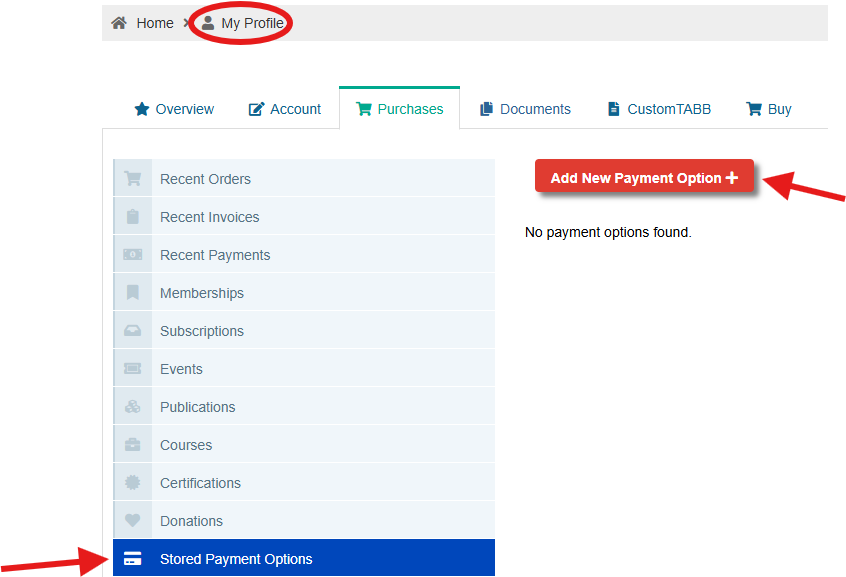
Navigate to “My Profile” on the ASBH website, then the “Purchases” tab. Once there, scroll down to “Stored Payment Options,” then click “Add New Payment Option." A saved payment method is required to set-up Auto-Pay for membership.
How do I become a member and enroll in autorenew?
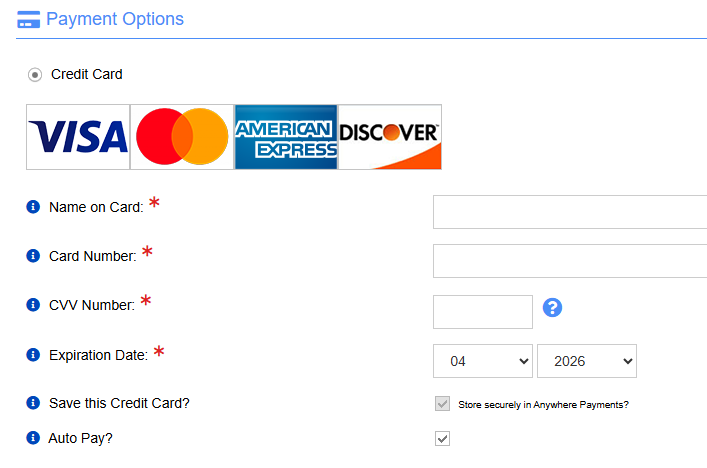
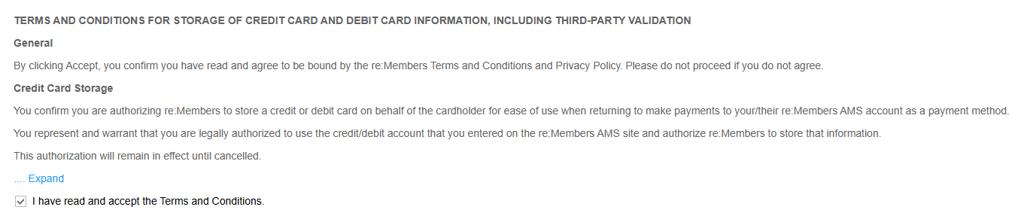
Go through the standard “Become a Member” workflow, completing all required information. Once you get to the payment page at checkout, click the “Auto Pay” checkbox and the terms and conditions checkbox. Checking the "Auto Pay" box will automatically require you to save the credit card to your account.
How can I update my credit card?
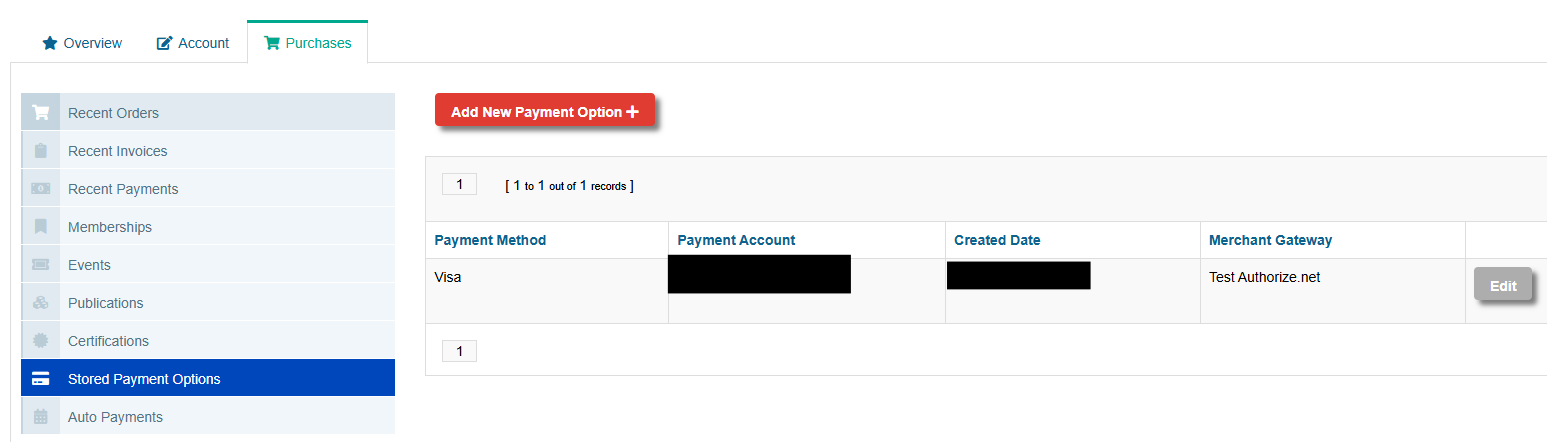
To update your credit card, go to “My Account,” then the “Purchases” tab. Scroll down to “Stored Payment Options,” and click the edit button next to the payment option you want to update.
Can I change the credit card on my autorenew order?
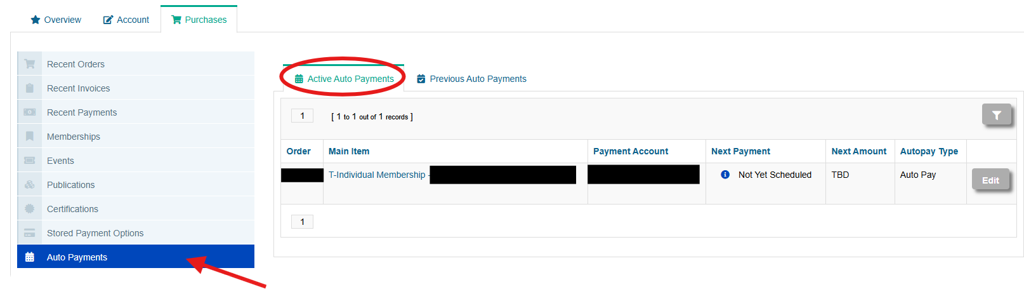
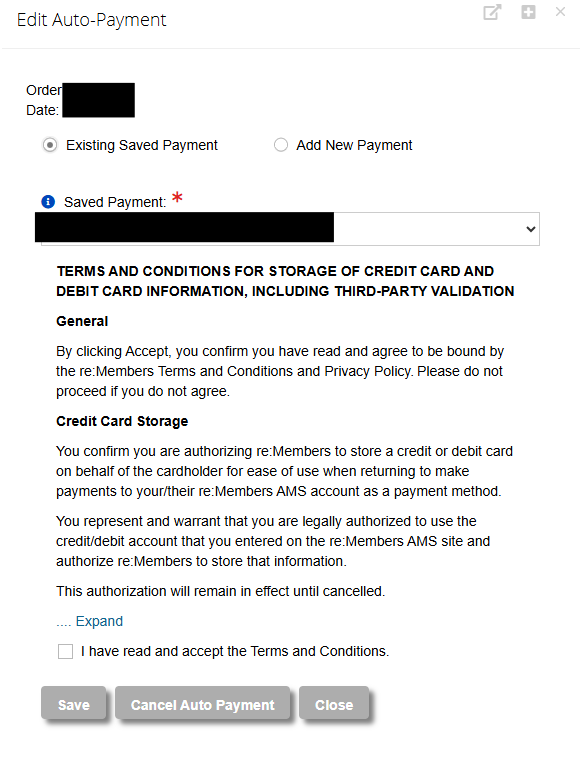
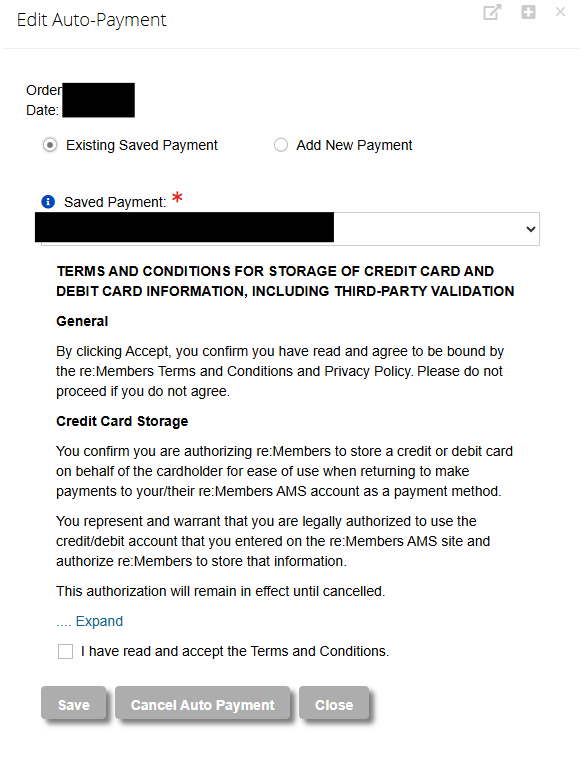
To change the stored payment method on your autorenew order, navigate to “My Account,” then the “Purchases” tab and the “Auto Payments” section. In the “Active Auto Payments” tab, you’ll be able to see any active orders. Click the edit button to make changes. If you already have another saved payment method stored in the system, you can select it in the dropdown tab. You can also add a new payment method.
My income level changed, can my rate be changed on my auto-pay order?
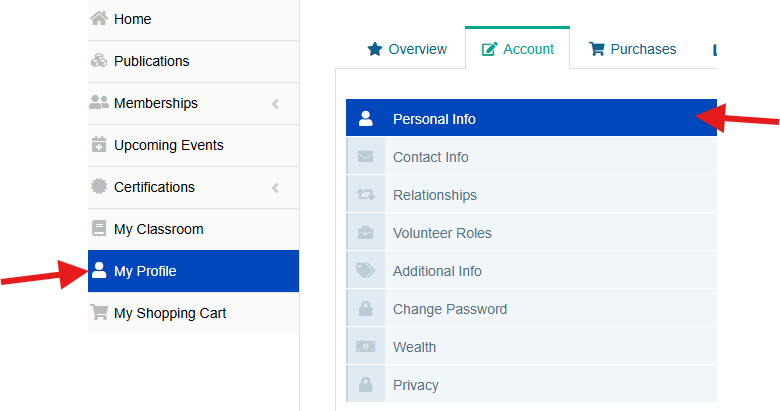
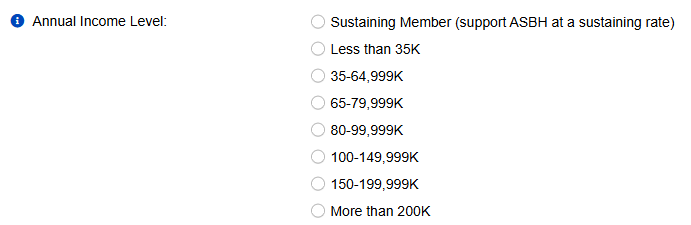
You can update your income level at any time. The new rate will be applied to your autorenew order, so long as you are more than 15 days out from your automatic renewal date. Navigate to “My Profile,” then the “Account” tab and “Personal Info” section. There will be an “Annual Income Level” field that you can update. Be sure to click "Save" at the bottom of the page to be sure that your updated rate is adjusted.
If you are less than 15 days out from your automatic renewal date, please call Member Services at 847.375.4745 to ensure the updated rate is reflected in your upcoming renewal.
I am already a member, how do I enroll in auto-pay?
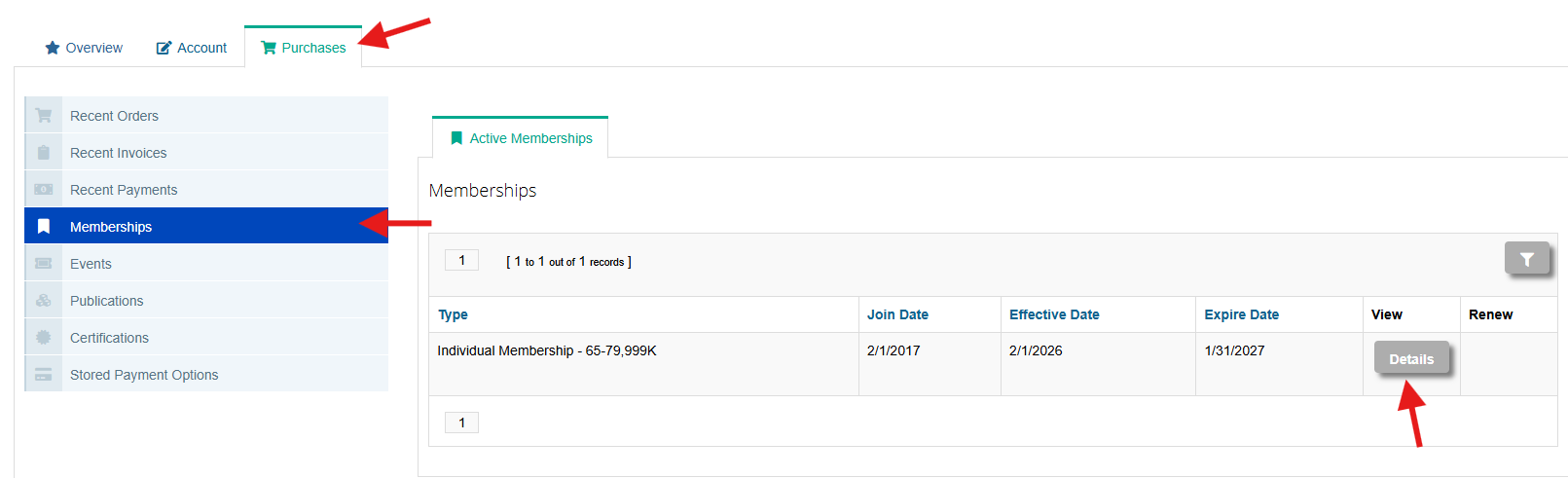
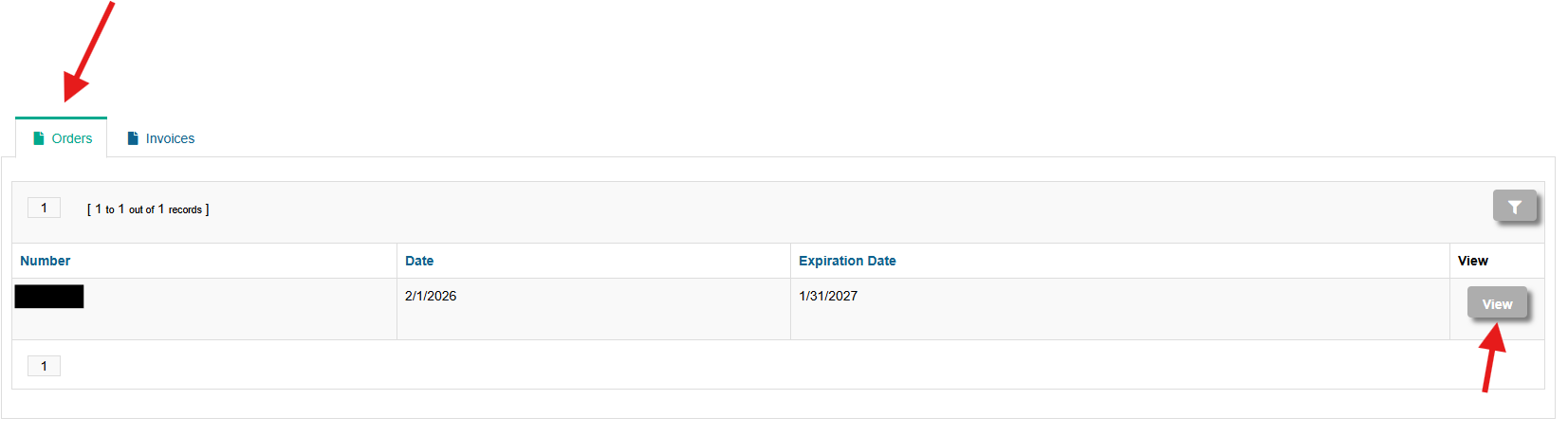
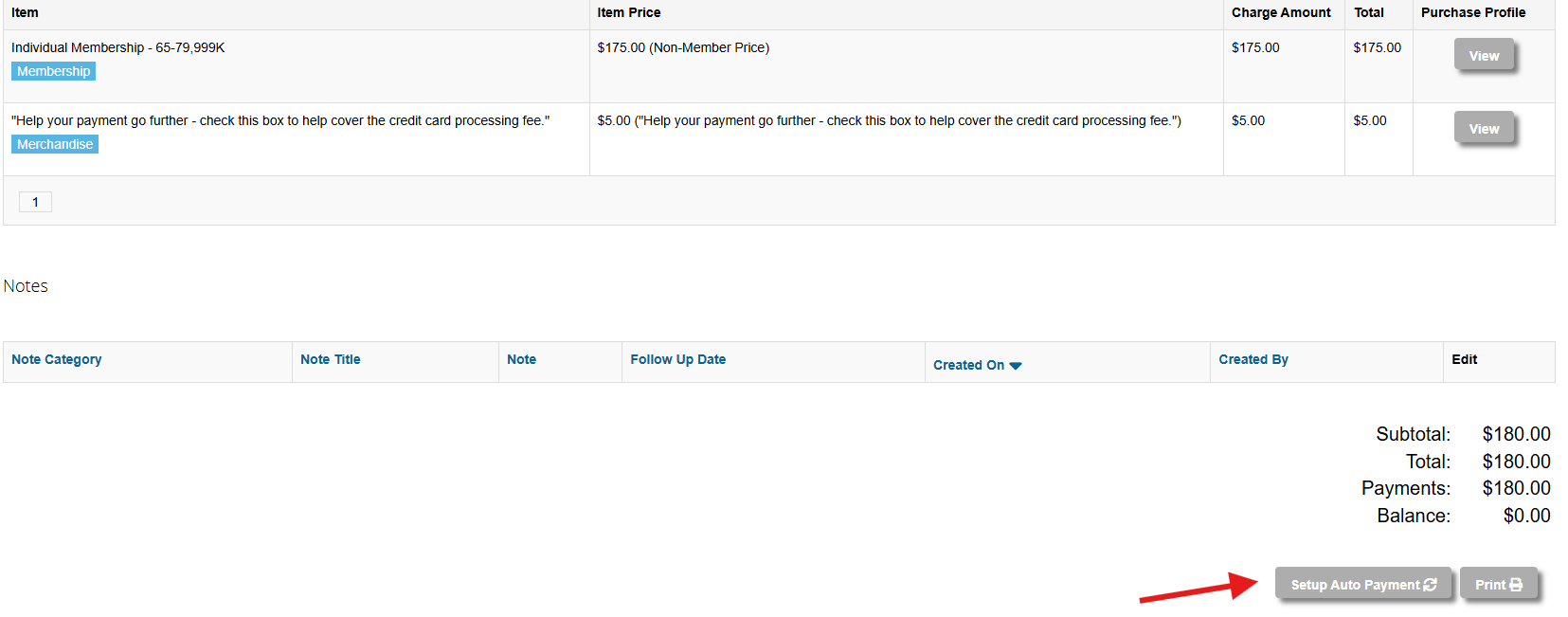
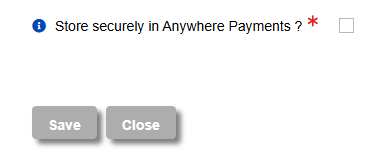
If you are already a member, you can still enroll in auto-pay! Navigate to “My Profile,” then the “Purchases” tab. Click "Memberships," then the details button next to your membership. Once the new page opens, make sure you are on the “Orders” tab, then click the “View” button. Scroll down to the bottom of the page and click “Setup Auto Payment." Once there, enter your credit card information and click the “Store securely in Anywhere Payments?” checkbox.
Will I receive a notification before I'm charged?
Yes, you will receive multiple reminders of your upcoming autorenewal date prior to the saved payment method being charged.
How do I cancel auto-pay?
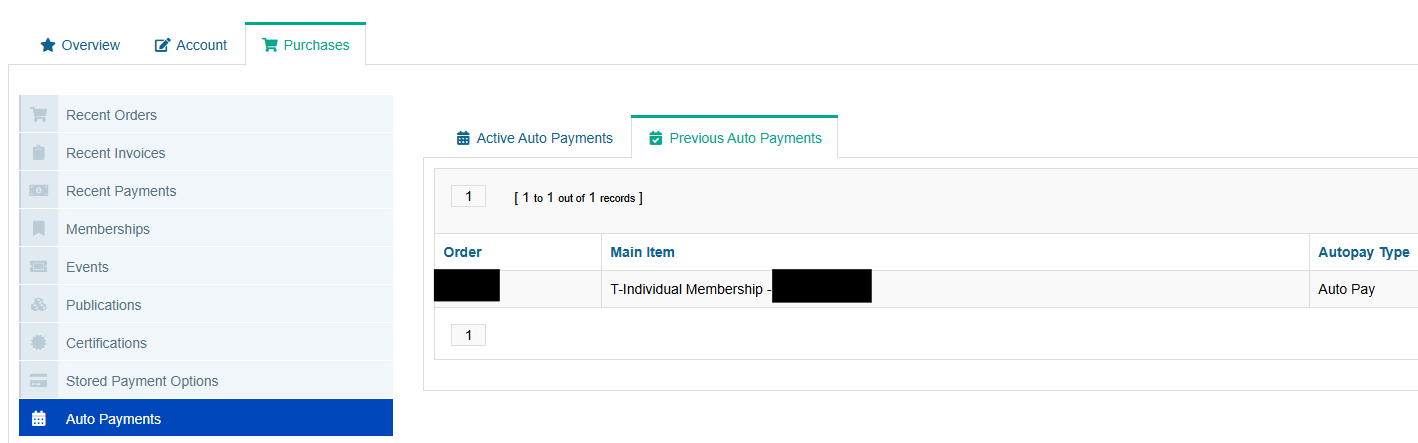
To cancel autorenew, you will navigate to “My Account” then the “Purchases” tab and the “Auto Payments” section. In the “Active Auto Payments” tab you’ll be able to see any active orders. Click the edit button to make changes. Scroll down and click “Cancel Auto Payment” and confirm. Your information will now show up in the “Previous Auto Payments” tab.
Annual Conference and Proposals
Abstracts
What if I did not anonymize my abstract?
Abstracts that contain identifying information will not be reviewed or accepted for the program. You are responsible for removing all identifying information, such as speakers’ names and institutions, from the abstract prior to submission. Please double-check your proposal before submitting to make sure your proposal does not have any identifying information.
Can I see examples of abstracts that were accepted into the conference?
You can see examples of accepted abstracts in the 2024 Annual Conference schedule. You can also find advice on writing your abstract on the ASBH website.
Can I submit my abstract to other conferences?
You are not able to submit an ASBH proposal to other conferences or journals prior to the proposal deadline, and ASBH may not consider a paper whose central, substantive content has already been published.
How do I write an effective abstract?
The Program Committee has provided a series of tips for writing an abstract, available here. Please note that you are not required to use these guidelines and their use does not guarantee an opportunity to present at the Annual Conference.
Accommodations
How can I get an accommodation for a special need?
Special accommodations can be requested in the proposal submission form. Please contact ASBH’s Education and Operations Manager, Lauren Winters, at This email address is being protected from spambots. You need JavaScript enabled to view it. regarding any further accommodations.
My co-presenter cannot present in person. Can they present virtually instead?
It is expected that all presenters must attend the Annual Conference in-person in order to present. Only submit proposals including presenters that will agree to register and pay to attend the conference in Portland.
Co-Authors of Papers and Flash Presentations
May co-authors of a paper or flash presentation present at the conference?
Paper and flash presentations will have only one designated presenter. A co-author that chooses to attend the conference may offer brief remarks, but the designated presenter will be the only formal presenter recognized in conference materials and communications.
Do co-authors need to register and attend the conference?
No, co-authors of paper and flash proposals are not required to attend the conference. If they do choose to attend, they will be required to register and pay for the conference registration.
Will co-authors be recognized in the conference program?
Co-authors will be recognized by name in the conference schedule.
Deadlines
By which date do I need to submit a proposal?
Proposals are typically accepted from early January through early March. Check back in January 2026 for more information on next year’s Call for Proposals!
I’ll be away from work during the week of the deadline. Can I get an extension?
We are unable to offer any extensions, and thus we strongly recommend that all those submitting proposals do so well in advance of the deadline.
I thought my proposal was submitted, and now the deadline has passed. What can I do?
Unfortunately, we cannot offer any exceptions for those who did not submit their proposal in advance of the deadline. Be sure to hit both the “save” and “submit” buttons on the top right of your proposal page to enter your proposal into consideration. You will receive a confirmation email once your proposal has been submitted; please be sure to check the submission portal if you did not receive a confirmation email.
I’m presenting at the conference. Do I have any deadlines to worry about?
Yes, the primary presenter of each presentation must accept the opportunity to present via the Speaker Portal by Monday, June 23. All speakers must register for the conference and use the Speaker Portal to submit their COI information by July 15, 2025. Failure to meet these deadlines may result in removal from the program schedule.
Location
Where will the Annual Conference be held this year?
The 2025 Annual Conference will be held in-person at the Oregon Convention Center in Portland, OR. Information on travel and lodging is available now.
How does ASBH choose conference locations?
The Board of Directors chooses conference locations using a number of determinants, including site price, room rates, available dates, additional costs and fees, and average flight costs from locations across the country.
Presentations
What resources will be available to presenters?
All presentation rooms will be equipped with a laptop, projector, projection screen, podium microphone, tabletop microphone, lavalier microphone, and a slide advancer.
Do I need to visit a Speaker Ready Room?
ASBH no longer offers a Speaker Ready Room and does not require speakers to visit any Ready Room prior to their presentation. If you have last-minute technological needs, we recommend the use of a personal device or the conference hotel’s business center.
How do I submit my slides? Is there a deadline to do so?
Presenters are not required to submit slides in advance of their presentation date and instead are required to bring their slides on a thumb drive to their presentation session. Presenters will have the option to make their slides available in the conference app prior to the presentation if they so choose.
Are there any resources available for those presenting an exhibition or installation?
If you are interested in proposing an exhibition, installation, or other unique programming idea that will require additional resources to realize, ASBH may offer limited reimbursements to support these endeavors. All requests for additional resources or funding requests should be detailed in the submission to ASBH’s Call for Proposals. ASBH may not be able to grant all requests, and the requests will be considered on a case-by-case basis by the Program Committee and ASBH staff.
Registration
How are registration rates determined?
Registration rates are set by the Board of Directors each year during the budgeting process. The Board balances the need to cover conference expenses with the desire to keep registration rates accessible and comparable with similar interdisciplinary conferences.
Do speakers need to register for the conference?
All speakers must register and pay for the conference in order to present. Speakers who have gone through the abstract submission process must register by a specific deadline in order to reserve a spot in the conference schedule. Reach out to This email address is being protected from spambots. You need JavaScript enabled to view it. for more information on registration deadlines.
How can I get a discount on ASBH Annual Conference registration?
ASBH offers discounted rates for students and members. If you decide not to become a member, you can still receive a discount by registering before the early-bird deadline in September.
Review Process
By which criteria are abstracts reviewed?
Abstracts are reviewed using a rigorous 3-stage process:
- All submissions are reviewed anonymously by three ASBH members recruited for their expertise in the topic category selected. Each reviewer is asked to score the proposal on a 5-point scale considering contribution to existing knowledge; innovation, cutting-edge, and novelty; presentation of innovative solutions to current issues in the fields of bioethics and health humanities; cross-disciplinary approaches; and quality of the written proposal.
- At the second stage of the process, one experienced reviewer for each category assesses all the individual and average scores throughout that category, taking into consideration factors such as significance, innovation, relevance, breadth of topic, and appropriateness for the meeting.
- Finally, the Program Committee—with access to all the previous assessments—selects the strongest proposals that address topics of interest to a multidisciplinary community. The Committee then considers balance among the categories and subjects, and identifies unique or unusual topics. The Program Committee may unblind proposals in its final deliberations as it relates to the speakers’ experience with the topic, session formatting, diversity of speakers, speakers’ presentation history, and compliance with the two-presentation rule. If a speaker has a repeated history of late withdrawals from the conference schedule, the committee may factor this history into their final programming decisions.
When will I know if my proposal has been accepted?
All decision notifications have been sent out as of June 4, 2025. Please reach out to This email address is being protected from spambots. You need JavaScript enabled to view it. if you did not receive a notification.
Speakers
May I include speakers outside the fields of bioethics and the health humanities in my conference proposal?
ASBH’s Guest Speaker Policy allows for speakers outside the fields of bioethics and the health humanities to offer a unique point of view at the Annual Conference. Designated Guest Speakers may attend the session at which they are presenting without paying registration fees, with the understanding that they will attend only the session in which they are presenting. This designation is limited to nonmembers who otherwise would not attend the ASBH Annual Conference and who either (1) work in a governmental, industry, or comparable capacity not directly related to bioethics or the health humanities and would bring a unique point of view; or (2) represent patients and/or family members who have a connection to the topic being presented. To submit a request for the Guest Speaker designation, send an email to This email address is being protected from spambots. You need JavaScript enabled to view it. with the desired guest’s name, email, and an explanation of their qualification for the designation.
How can my co-presenters submit a conflict of interest (COI) disclosure form?
Upon acceptance into the schedule, all presenters will be prompted to complete a COI disclosure form via the email listed on the proposal submission. All presenters and co-presenters must complete the form in order to be accepted into the final program schedule.
What’s the difference between a co-author and a co-presenter?
Co-authors will only be listed on paper or flash presentations; co-authors will not be recognized as presenters in the conference schedule and communications. Co-authors are not required to attend the conference.
Co-presenters may contribute to a preconference workshop, panel, workshop, debate, or performance/exhibition. Panels and debates are required to list at least one co-presenter on their proposal submission. Co-presenters are required to submit COI information, register for the conference and pay the appropriate registration fee, and attend the conference in person.
Submission
How will I know if my proposal has been submitted?
You will need to press the blue “submit” button on the upper-right corner of your proposal page to submit. You will receive a confirmation email upon submission, and your proposal will then be marked “complete” on the submission portal. If you do not receive a confirmation email, please revisit the proposal submission portal prior to the deadline to confirm your proposal’s status or resend the confirmation email.
What do I need to submit a proposal?
You can view a list of 2025 proposal requirements and more information about the various proposal formats here.
I inputted my information, but I don’t see a “Submit” button at the top of the screen. How do I make sure my proposal was submitted?
If you do not see a “Submit” button at the top of the page, you have not yet completed all of the tasks required to submit your proposal. Check that each task is complete by looking for a green checkmark, and finish any outstanding tasks in order to submit the proposal for review. Click “Save” once all of the tasks are complete, then click “Submit” to ensure your proposal is submitted for consideration.
What if I need to change my proposal after I submitted it?
Please reach out to This email address is being protected from spambots. You need JavaScript enabled to view it. with any requested changes. We are unable to make any substantive proposal changes, including any changes to the abstract, title, learning objectives, category, or presentation format, after the submission deadline.
Certification
What is the relationship between ASBH and the HCEC Certification Commission?
In 2017, ASBH decided to advance its mission by creating a functionally autonomous body, the Healthcare Ethics Consultant Certification Commission (“the Commission”), with responsibility for administering a certification program for healthcare ethics consultants. The purpose of the certification program is to promote excellence and professionalism within the field of health-care ethics consultation by documenting individual performance as measured against a predetermined level of knowledge and skill.
The Commission has autonomy in decision making for all essential certification policies and activities such as eligibility standards; standards for initial certification and maintaining certification; disciplinary determinations; the development, administration, and scoring of examinations; and the selection of subject-matter experts.
ASBH retains decision-making authority for non-essential certification decisions including those related to staff selection and office location; marketing and communication efforts; and final budget or contract approval as long as sufficient financial resources are provided for the certification program and as long as policies and procedures are in place to provide for autonomy in essential certification decisions. These decisions shall be made in collaboration or consultation with the Commission.
How can I obtain the Healthcare Ethics Consultant-Certified (HEC-C) credential?
To become an HEC-C, you must meet the qualifications outlined in the Candidate Handbook, pay the application fee, and pass the qualifying examination. Learn more about the process and download an application here.
Still have questions? Contact ASBH Member Services at This email address is being protected from spambots. You need JavaScript enabled to view it. or 847.375.4745.